
Someone always asks the question in a budget review: the Microsoft tenant already includes a phishing simulation tool, so why is the organization paying for another one?
It's a fair question, and the answer depends on what you need to test and how much time you're willing to spend running it. Here's what the tool includes, which license unlocks it, what it does well, and where teams start to outgrow it.
What is Microsoft attack simulation training?
Microsoft attack simulation training is the phishing simulation and training feature built into Microsoft Defender for Office 365. It sends harmless simulated phishing messages to your employees and assigns training modules to the people who fall for them.
You will find it under Email and collaboration in the Microsoft Defender portal, as part of the wider Microsoft Defender XDR suite. It replaced the older Microsoft 365 attack simulator experience, so older documentation you may have bookmarked describes a different interface.
Five pieces make up a simulation, and the terms recur throughout the rest of this article:
- A payload (the message itself)
- The target users
- A phish landing page (what someone sees after they click)
- End-user notifications
- The training assigned afterwards
Administrators can let Microsoft select training modules automatically, choose modules manually, or redirect users to a custom URL.
What license you need for Microsoft attack simulation training
The short answer is Microsoft 365 E5 or Microsoft Defender for Office 365 Plan 2. The longer answer matters if you are on E3, in a government cloud, or working out who needs which admin role to launch a campaign.
Microsoft 365 E5 and Defender for Office 365 Plan 2
Attack simulation training requires Microsoft 365 E5 or Microsoft Defender for Office 365 Plan 2. Plan 2 arrives inside subscriptions like Microsoft 365 E5, and it can also be bought as a standalone add-on license, so an organization on a lower tier can reach the feature without moving its whole estate to E5. Defender for Office 365 plan comparison sets out what each plan includes.
Access stalls projects roughly as often as licensing does. Running simulations requires the Attack Simulation Administrator role, or Security Administrator for broader access. Assign least privilege rather than handing someone Global Administrator to get a campaign out.
What E3 tenants actually get
E3 tenants get caught out here more than anywhere else. They receive a trial subset only: the credential harvest payload and a choice between two named training experiences. Nothing else in the feature set is included.
If you are on E3 and planning a program around this tool, that constraint is the whole planning conversation.
GCC, GCC High and DoD availability
Attack simulation training is available in Microsoft 365 GCC, GCC High, and DoD environments. Certain advanced features are absent in GCC High and DoD, including payload automation, recommended payloads, and the predicted compromise rate among them. A public-sector program should confirm which capabilities reach its own tenant before building a plan around them.
What Defender attack simulation training does well
A reader can check all of this in their own portal within a few minutes, so it is worth being accurate about the strengths. On the things it was designed for, the tool is solid.
It’s already included in your tenant
No separate procurement, no new vendor review, no additional integration work if you already hold the license. It also sits beside the email security controls your team already runs (Safe Links, threat policies) in the same portal, which means one console rather than two.
Targeting: Departments, priority accounts and repeat offenders
Targeting is genuinely capable. Recipient filters cover department, country, priority account status, risk level, repeat offenders, and people left out of recent campaigns. Microsoft 365 groups and Entra groups are the practical way to manage audiences at scale. Importing lists by hand doesn’t survive contact with a growing organization.
The six social engineering techniques it supports
Six payload types are available, and this is what most buyers compare:
- Credential harvest: a link to a fake sign-in page that captures what the user types.
- Malware attachment: an attachment that would run code if opened.
- Link in attachment: a file that contains a link to a fake sign-in page.
- Link to malware: a link to a malicious file hosted on a site like SharePoint.
- Drive-by URL: a link to a site that tries to run code in the background.
- OAuth consent grant: a request for a malicious app to access the user's data.
The payload set also covers QR codes, so a quishing scenario is possible. That list covers the email attack surface thoroughly. Note what is not on it.
Global, tenant, and custom payloads
The distinction is simple once stated:
- Global payloads ship with the product.
- Tenant payloads are the ones your organization has created.
- Custom payloads can be built from scratch, including the login pages and landing page the simulation uses.
Simulation automations and training campaigns are how recurring activity gets scheduled rather than launched by hand each time.
The limitations of Microsoft attack simulation training
These are scope limits. The tool runs phishing simulations against email inside Microsoft's own estate, and it does that well.
Email phishing only: no voice, video or Teams simulations
This is the central limit. The 2026 incidents ran through voice calls, cloned audio, deepfake video, and collaboration tools, and the tool simulates none of them. A program that tests only email leaves those channels untested.
The EtherRAT campaign abusing Microsoft Teams shows what a fake IT support approach looks like inside a tool employees treat as internal, and voice phishing trends in 2026 covers the channel that has grown fastest.
A fixed training catalog on a vendor release cycle
Content comes from a built-in library that updates on Microsoft's schedule. A threat that emerged this month has no module behind it, and nothing in the catalog reflects your policies, your systems, or the words your organization actually uses.
Reporting covers compromise rate, not per-employee risk
What it reports, it reports well: the predicted compromise rate, repeat offenders, and training completion. What it doesn't produce is a per-employee view of phishing risk that combines simulation behavior with other security signals. Why completion rates measure the wrong thing explains why that gap matters.
Operational limits worth knowing before you build on it
Three practical constraints. Shared mailboxes aren't supported. On-premises mailboxes work, but with reduced reporting. And there are no PowerShell cmdlets for the feature, which matters to any team automating a reporting pipeline or scripting campaign setup.
When Microsoft 365 security awareness training is enough
Answer these four questions about your own program. The first two usually settle it; the last two decide how long the answer holds.
- Do you already hold E5 or Defender for Office 365 Plan 2? If not, the license cost is the real comparison rather than the feature list.
- Are you testing channels beyond email? If voice, video, or collaboration tools are in scope, the built-in tool can’t cover the cyberattacks arriving through them.
- Does the training need to reflect your own policies and systems? Or is a general catalog sufficient for what you are trying to change?
- Do you need a per-employee risk measure, or is compromise rate enough?
The answer most organizations reach is that the built-in tool can run an email-only program on compromise-rate reporting, and that answer understates what it costs to run. The license is included. Building each campaign is still your team's job.
Someone has to build each custom payload and landing page by hand, manage audiences, assign training, and assemble reporting without any scripting interface to lean on. For a two-person security team, that is a recurring commitment measured in days per quarter, all of it production work.
The comparison worth making is the included license plus your team's time against a platform where the production work is what you're buying. That calculation changes the moment the program grows beyond a quarterly email campaign, and it changes again the first time someone asks what happens when the attack does not arrive by email.
What a dedicated phishing simulation platform adds
Frame Security is an AI-native Human Risk Security platform, and the useful way to read it against the tool in your tenant is limit by limit, in the order raised above. Each point below maps to one constraint.
- Channels. Phishing and deepfake simulations run across email, voice, and deepfake video, so the attack types that bypass email-only programs are actually tested rather than assumed.
- Context. Simulations generate from your organization's real org chart, vendor relationships, and communication patterns rather than coming from a payload library, with difficulty that adapts per employee as their behavior changes. The production work that consumes admin time in the portal is what the platform does automatically.
- Content currency. Security awareness training modules generate from a description in minutes, so a threat that emerged this month can be in front of employees this week rather than waiting for a catalog update.
- Measurement. Every simulation outcome (click, submission, report, or no action) logs as a signal in a per-employee Human Risk Score alongside training engagement and other behavioral signals, so human risk reduction shows movement by person and department.
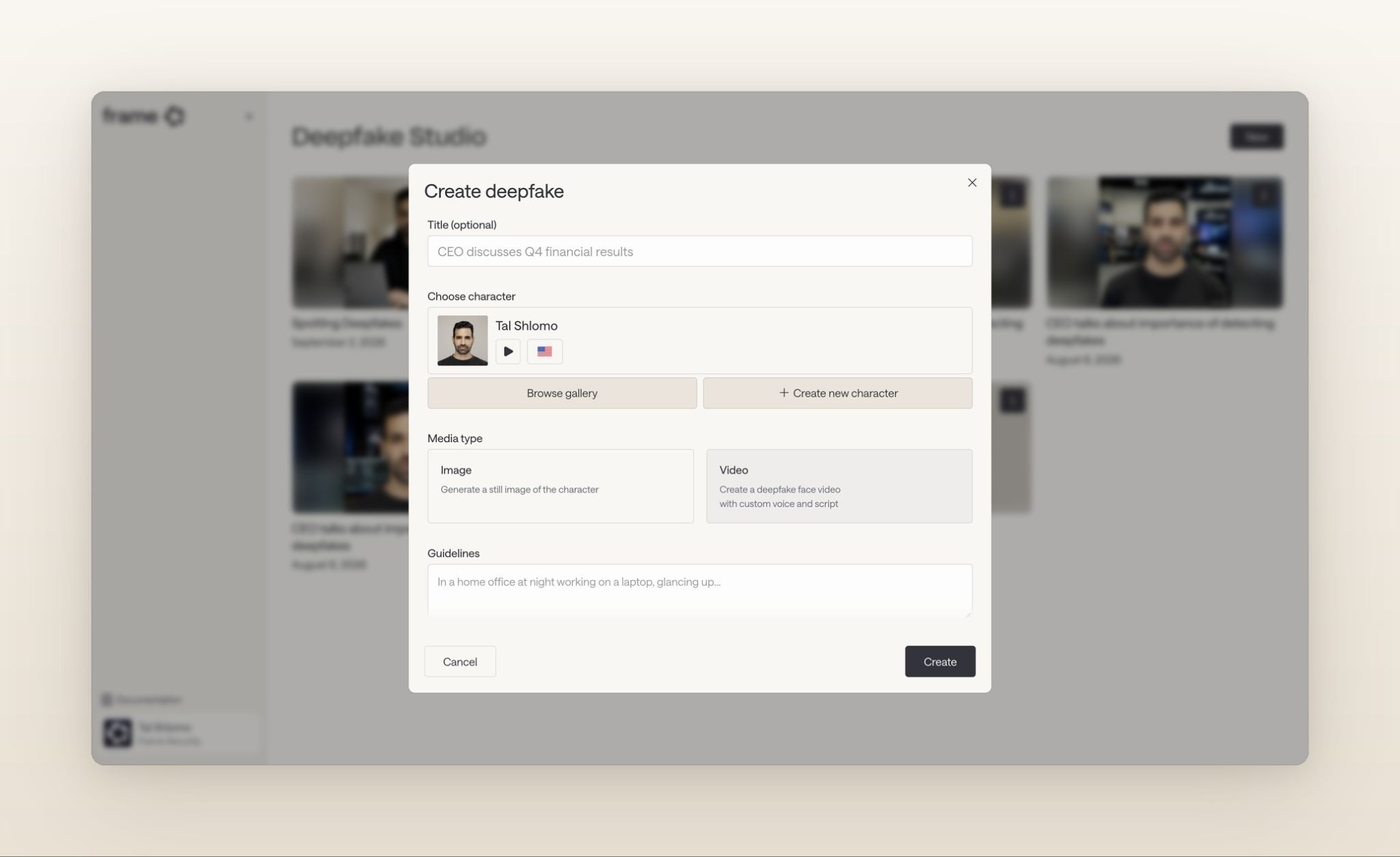
Frame's integrations connect to Entra ID, so the org mapping you already maintain carries over rather than being rebuilt.
The tool in your tenant answers whether people click a simulated email, and it answers it competently for as long as someone has the hours to run it. The questions worth asking next are what that time is worth, and what happens when the attack arrives as a voice call.
Book a demo and compare Frame Security against the campaign you last built by hand.
