
Most phishing simulation tools were built to test whether someone clicks a link in an email. A phisher picks whichever channel the target trusts, whether the goal is credential harvesting or a ransomware foothold.
Many 2026 attacks arrived as Teams calls, cloned audio, and deepfake video, and Verizon’s 2026 Data Breach Investigations Report found that mobile-centric phishing simulations, meaning voice and SMS, had a click rate 40% higher than email phishing simulations.
This guide covers six tools, chosen for an awareness program owner rather than ranked. It compares them on the channels they simulate, how far they personalize, what happens when someone fails, and what they cost.
Key insights
- Channel coverage is the main differentiator now. Email-only tools cannot test voice, deepfake video, or QR, which is where attacks have moved.
- Personalization varies far more than catalog size suggests. A library of 10,000 templates and a platform that generates scenarios from your org chart are different products, and the template count distinguishes neither.
- Almost nobody publishes pricing. Per-user rates cluster in predictable bands, but most vendors quote rather than publish, so figures circulating online are third-party estimates.
- A genuinely useful free option exists. For a first baseline, a self-hosted open-source tool or the simulator already in your Microsoft tenant will do.
How we selected these phishing simulation tools
We looked at vendors that sell phishing simulation to organizations running an internal awareness program and document their product publicly, then compared them on five things:
- Channels simulated. Beyond email: SMS, chat, voice, QR, deepfake video. The social engineering tactics, such as urgency and impersonation, stay the same across channels; only the delivery changes.
- Scenario source. A fixed library, threat intelligence, or your own organizational context.
- What happens at failure. Coaching on the spot, or a module assigned later. Short micro-training delivered right away counts as on the spot; a long course scheduled later does not.
- Reporting output. Completion and click rate, or behavior-based risk scoring.
- Pricing transparency. Published list rates, or quote-only.
Frame Security publishes this guide and is on the list, assessed against the same criteria from its own documentation. Tools built for practitioner red-team training are out of scope.
Phishing simulation tools compared
All cells checked against each vendor's own published documentation in September 2026.
Ratings reflect fit for an awareness program owner against the six criteria above, and capabilities in this category change frequently enough that a demo tells you more than a feature list.
The six phishing simulation tools
The tools are unranked. Frame leads because it publishes this guide. Each entry covers what the tool is, what it does well, where it stops, and who it suits.
1. Frame Security: Simulations across email, voice, and deepfake video
What it is: an AI-native Human Risk Security platform where simulation, training, and risk scoring run from one engine.
What it does well: phishing and deepfake simulations cover email, voice, and deepfake video. Frame generates each scenario from your organization's real context: org chart, vendor relationships, and actual communication patterns.
That puts them closer to spear phishing, where attackers research a target through OSINT and write to it, than to a mass email. Difficulty adapts per employee as behavior changes, and coaching arrives the moment someone fails, in more than 70 languages.
Campaigns also run unattended. Setting up a multi-time-zone, multi-language, fully randomized campaign takes a few clicks, after which it runs in the background. That matters more than it sounds for a global organization, where the alternative is an awareness manager hand-scheduling regional waves so nobody in Singapore gets a simulation at 3 a.m. or Frankfurt gets the English version.
Every outcome feeds a per-employee Human Risk Score, so human risk reduction shows up as movement by person and department. A click rate can't show that. That per-person view is what teams moving toward human risk management need.
Where it stops: SMS is not currently in the channel set, and Frame was founded in 2024, so buyers needing a long operating history at their scale should ask for references first.
Who it suits: programs whose driving problem is realism against modern multi-channel attacks, and distributed organizations where scheduling is a real operational cost.
2. KnowBe4: The largest template library
What it is: the market's default for a decade and the comparison point for most large rollouts.
What it does well: the biggest template catalog available, broad compliance coverage, and an install base that makes it the institutionally safe choice. It has also moved: current KnowBe4 carries AI-generated templates, vishing added in July 2026, callback phishing, smishing, and a risk score built on hundreds of behavioral indicators. It is the only vendor here publishing list pricing.
Where it stops: the architecture is library-first. Personalization operates by selecting and routing from a central catalog rather than generating against your specific organization, and the reporting center of gravity remains completion and click rate. Alternatives to KnowBe4 covers the wider field.
Who it suits: large rollouts that value breadth, compliance depth, and a vendor every auditor already recognizes.
3. Hoxhunt: Adaptive, gamified engagement
What it is: a platform built around turning phishing reporting into a habit through game mechanics.
What it does well: adaptive difficulty per employee, real-time feedback, and the strongest engagement mechanics in this list. Its risk layer scores individuals on observed behavior rather than course completion.
Where it stops: the reporting-habit foundation shapes what the platform optimizes for, and content generation works at the level of prebuilt training packages rather than modules built from your own policies on request.
Who it suits: programs whose primary goal is lifting reporting rates and sustaining participation.
4. Proofpoint: Simulations driven by threat intelligence
What it is: the awareness layer of Proofpoint's email security stack, now branded ZenGuide.
What it does well: it converts attacks the gateway actually caught into simulation templates, making scenarios genuinely relevant to what reaches your people. Risk correlation pulls in behavior, role, access, and live attack exposure.
Where it stops: the signal that makes it good is Proofpoint's own email security data, so outside that ecosystem the value drops sharply. Voice is absent from the simulation set.
Who it suits: organizations already committed to Proofpoint for email security.
5. SoSafe: EU and GDPR-first programs
What it is: a European-headquartered platform built around GDPR compliance and localized content.
What it does well: data residency and localization depth that suit European and multi-region organizations, with simulations across email, SMS, and QR codes and a risk layer pulling signals from identity and endpoint tools.
Where it stops: its privacy-by-design model lets you run training anonymously, individually tracked, or a mix, and every step toward anonymity removes per-employee data you would otherwise act on. Deepfake video is absent.
Who it suits: EU-headquartered organizations and anyone with a works council in the approval path.
6. Microsoft attack simulation training: Already in the tenant
What it is: the simulator bundled with Defender for Office 365 Plan 2, included in Microsoft 365 E5. You run it from the Microsoft Defender portal.
What it does well: it is already paid for, targeting is solid, and it ships a broad built-in payload set with custom payloads available, including QR code payloads as well as email. For an organization holding the license, this is the baseline every paid tool has to beat.
Where it stops: no voice or deepfake video, a training catalog far narrower than a dedicated platform’s, and the capability is license-gated. E3 customers get only a trial subset with a single payload type. People who fail are routed to assigned remedial training rather than coached in the moment.
Who it suits: organizations already on E5 or Defender for Office 365 Plan 2 running an email-focused program.
How to choose the best phishing simulation tool
Five questions about your own security awareness program will narrow the six tools above faster than a feature comparison will. Each answer rules some tools in and others out.
- Which channels do you need to test? If voice, video, or QR are in scope, email-only tools are out regardless of how they score elsewhere. Email still matters, since business email compromise (BEC) schemes such as CEO fraud still arrive there, but it is no longer the only channel to test.
- Do you already hold the Microsoft license? If so, the built-in simulator is your baseline, and the question becomes what a paid tool adds over something already funded.
- Does training need to reflect your own systems and policies? A general library covers general topics. Your AI acceptable-use policy and your vendor names are not in anyone's catalog. If you work under HIPAA or go through SOC 2 audits, also ask how each vendor documents training completion.
- What happens at the moment of failure? Immediate coaching or a module assigned next week? Short micro-learning lessons delivered right after the click fit that timing. Training delivered at the moment of failure covers why the timing carries most of the effect.
- What does the reporting need to show a board? If the answer is risk movement rather than completion, ask each vendor what their number is built from. Questions to ask before renewing covers the rest of that conversation.
How much do phishing simulation tools cost in 2026?
Most vendors in this category quote rather than publish, so the per-vendor figures circulating online are third-party estimates that vary widely. Treat them as directional.
- SMB and lower mid-market, roughly 25 to 500 seats: $2 to $4 per user per month at list, before negotiation.
- Enterprise, above 1,000 seats: below $2 per user per month, with the rate falling as seat count rises.
- Typical annual contract at common seat counts: low five figures for mid-market, moving into six figures for large multi-product deals.
KnowBe4 is the exception that publishes: its list rates run from $1.63 to $3.75 per seat per month on a three-year term, depending on band and subscription level, as of May 2026. Everyone else on this list quotes. Microsoft's is bundled into a license you may already hold.
Negotiation moves these numbers materially. The procurement platform Vendr, which benchmarks anonymized software contracts, reports that outcomes in this category vary widely with deployment size, term length, and competitive pressure, and that multi-year and volume commitments are what move a quote.
Three costs buyers routinely miss: internal program management time, the largest hidden line item; content customization, where a library-first tool bills for what a generation-first tool does natively; and integration work with identity providers and learning management systems.
Frequently asked questions
What is a phishing simulation tool?
Software that sends controlled, harmless fake phishing messages to employees, measures who clicks, reports, or ignores them, and assigns training based on the result. The better ones also coach at the moment of failure and feed outcomes into a risk score rather than stopping at a click rate. The point is practice against real phishing attacks without the consequences.
Are there free phishing simulation tools?
Yes, with trade-offs. GoPhish is free and self-hosted phishing simulation software, and suits a technical team running a first baseline; setup, hosting, and template creation are all manual.
Microsoft’s built-in simulator is included for organizations already on E5 or Defender for Office 365 Plan 2. The free phishing tests larger vendors offer are lead-generation tools for the vendor's sales team.
How often should you run phishing simulations?
Continuously, or at least monthly, rather than annually. Higher-risk roles, such as executives targeted by whaling, warrant harder scenarios and a tighter cycle than the general population. Pair the simulations with ongoing phishing awareness training instead of a once-a-year course.
Do phishing simulations actually reduce risk?
They do when the lesson lands at the moment of failure and results drive what happens next. They achieve very little when the simulation is only a test and a module arrives a week later.
Behavioral science points the same way: feedback works best when it follows the behavior closely. What the tool does after the click decides the result.
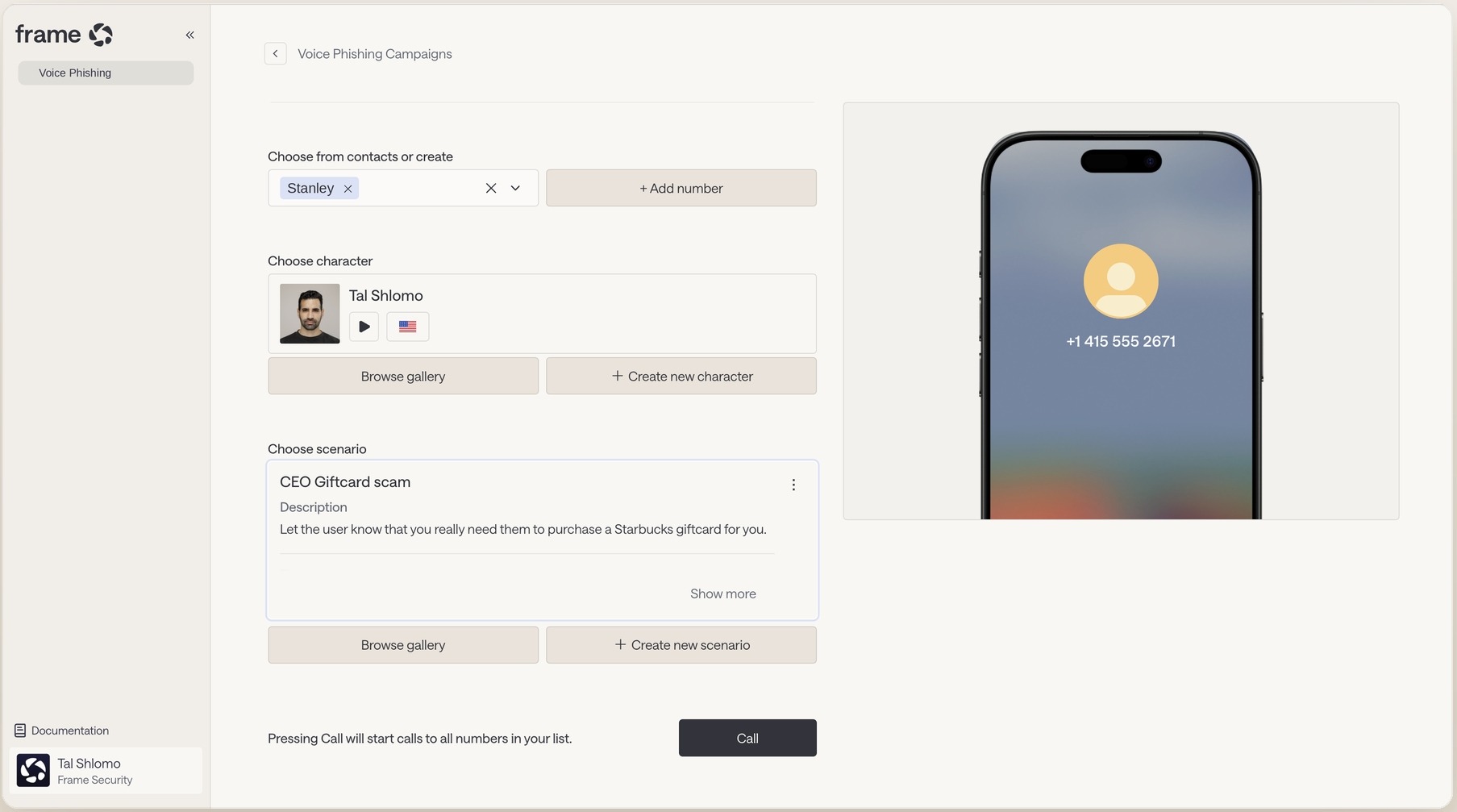
Channel coverage separates a 2026 shortlist from a 2019 one. Verizon's 2026 Data Breach Investigations Report found mobile-centric social engineering succeeding at a rate 40% higher than traditional email phishing, which is the argument for testing the channels your program currently does not.
Book a demo and run a voice simulation against the team you have never tested.
